

Best 10 Instagram Story AI Prompts for Men’s Engaging and Interactive Daily Updates
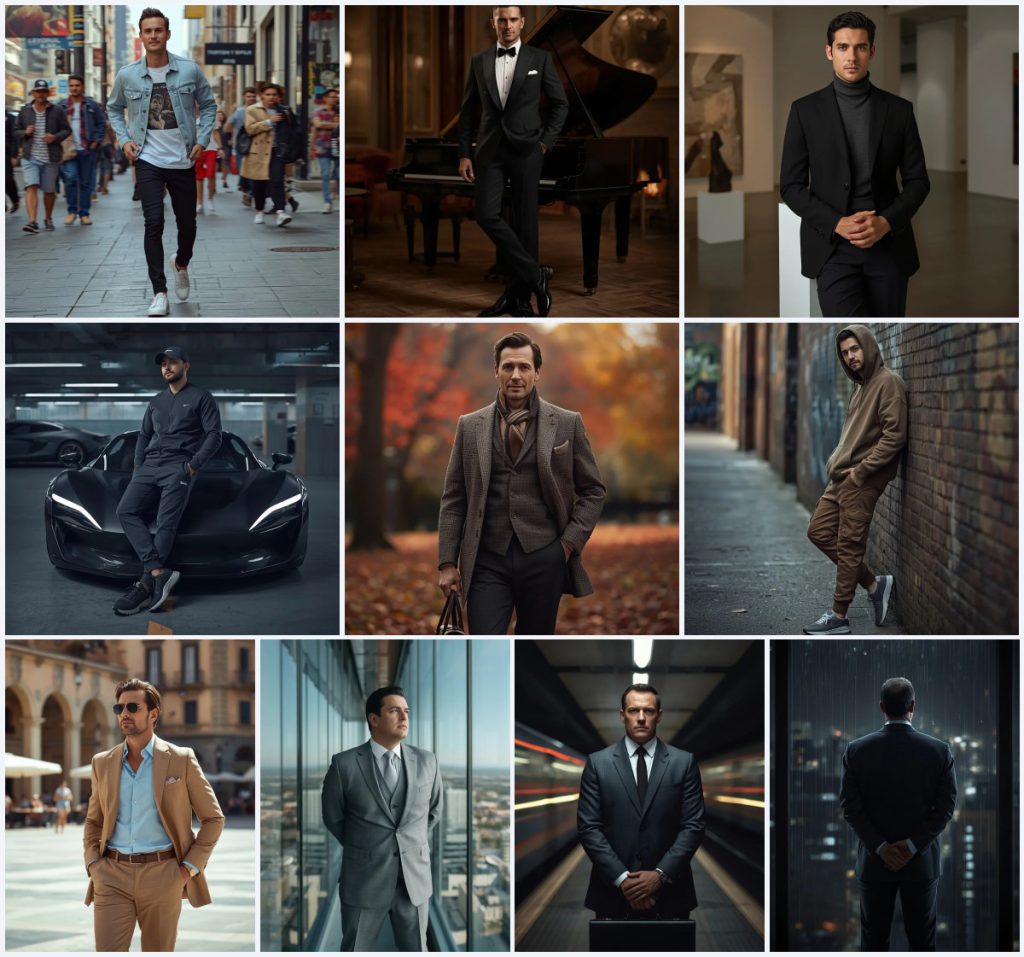
Instagram Stories reward images that feel immediate, personal, and visually strong. This collection of ten AI prompts gives you a full wardrobe of masculine looks, from a denim jacket on a busy sidewalk to a tailored suit in a glass office tower. Each prompt is written for a full-body male subject, so you can generate a consistent character across a day of updates without losing the thread of your story.
The set covers streetwear, formal elegance, autumn classics, and urban power. You can move from a casual tracksuit in an underground garage to a tweed jacket in an autumnal park, then to a rain-streaked window at night. The prompts share a common language of lighting, lens choice, and ultra-realistic detail, which makes them easy to adapt once you understand how each scene is built.
What these men's Instagram story prompts are asking for
These prompts ask an AI image generator to produce a full-body portrait of a man in a specific environment, with clothing, pose, lighting, and camera settings described in detail. The goal is a believable, editorial-quality frame that feels like a paused moment from a story rather than a stiff studio shot. Each prompt names a lens and aperture, such as a 35mm at f/2.0 or an 85mm at f/1.8, to guide depth of field and perspective.
- A full-body male subject in a dynamic or relaxed pose, often mid-stride or leaning.
- Specific clothing: light-wash denim jacket, classic black tuxedo, charcoal turtleneck, monochrome tracksuit, tweed jacket, oversized hoodie, tan linen suit, or tailored grey suit.
- A real-world background: city sidewalk, grand piano lounge, modern art gallery, underground parking garage, autumnal park, graffiti alleyway, European city square, glass office tower, subway platform, or rain-streaked high-rise window.
- Lighting direction: bright natural daylight, soft warm lounge light, diffused gallery lighting, neon strip lighting, autumn sunlight, gritty street light, or cinematic high-contrast lamps.
- Camera and quality tags: 35mm, 50mm, 70mm, 85mm, f/1.4 to f/2.8, 8K resolution, HDR, and ultra-realistic skin texture.
- Mood and expression: confident, thoughtful, cool, nonchalant, refined, serious, or contemplative.
The shared scene across the collection
Every prompt builds a small world around the man. In the denim jacket prompt, he is "mid-stride on a bustling city sidewalk" with "a vibrant blur of city life, pedestrians, storefronts, and street art" behind him. The tuxedo prompt places him "by a grand piano in a dimly lit, elegant lounge" with "soft ambient lighting and a hint of a roaring fire." The turtleneck prompt leans him against "a minimalist sculpture in a modern art gallery" where "abstract art pieces and clean architectural lines" frame his thoughtful expression.
The urban and power prompts shift the atmosphere. The tracksuit prompt sets him against "a sleek, futuristic car in a dimly lit underground parking garage" with "polished concrete, neon strip lighting." The hoodie prompt uses "a graffiti-covered wall in an urban alleyway" and "weathered brick." The business prompts move from "a sleek, modern glass office tower" to "a dimly lit subway platform at rush hour" and finally to "a large, rain-streaked window in a high-rise office at night." Each scene is chosen to match the clothing and the emotional register of the story you want to tell.
Why this collection works for daily Instagram updates
This set works because it gives you range without losing consistency. A follower who sees your story in the morning and again at night will recognize the same visual language: full-body framing, realistic skin, and a clear sense of place. That consistency builds a character, and a character keeps people watching.
- The prompts cover multiple times of day and social contexts, so you can post a morning coffee walk, an afternoon gallery visit, and a late-night office moment without repeating the same look.
- Each prompt includes technical camera details, which helps the AI produce a more photographic result and reduces the chance of a flat, plastic appearance.
- The variety of settings gives you natural hooks for interactive story elements, such as polls about which outfit works best or questions about where the character should go next.
Three style directions inside this prompt set
The collection contains three distinct style directions, and each one stays inside the boundaries of the original prompts. You are not asked to leave the set or invent a new genre; you are choosing which of the three existing moods to emphasize for a given story.
- Streetwear editorial: The denim jacket, tracksuit, and hoodie prompts use natural daylight or neon strip lighting, blurred urban backgrounds, and a cool, casual pose to create a contemporary streetwear look.
- Formal elegance: The tuxedo, turtleneck, and tan suit prompts rely on soft warm lighting, refined posture, and upscale interiors or European squares to project timeless masculine sophistication.
- Cinematic power: The three business-attire prompts use high-contrast or moody lighting, glass reflections, and a serious gaze to build a commanding, introspective atmosphere.
How to turn these prompts into a story-ready image
The workflow is simple, but small checks make a large difference. Start with one prompt from the collection, paste it into your chosen tool, and generate a first pass. Then review the result against the prompt text before you upload anything to your story.
- Copy the prompt. Select the full prompt text for the look you want, from the opening pose description to the final lens and resolution tags, and paste it into your AI image tool.
- Upload a reference. If the tool supports image references, upload a clear full-body photo of yourself or your subject so the AI can match facial features and body proportions.
- Generate the first image. Run the prompt once without changes to see how the model interprets the scene, clothing, and lighting before you start adjusting details.
- Check hands and face. Zoom in on the hands and face first, because these are the most common failure points; regenerate or use inpainting if fingers are merged or the expression looks unnatural.
- Check the main object. Verify the main object in the scene, such as the grand piano, the futuristic car, the sculpture, or the rain-streaked window, and make sure it matches the prompt description.
- Adjust and export. If the image is close, tweak one variable at a time, such as lighting or lens, then export at the highest resolution your tool allows for a crisp Instagram Story.
Choosing the right reference photo
A good reference photo does more for realism than any prompt tag. The AI needs to see your actual face and body shape to place you convincingly in these scenes. Pick a photo that matches the energy of the prompt you plan to use.
- Use a full-body or three-quarter-body photo with even lighting and no heavy filters, so the AI can read your true proportions and skin tone.
- Choose a neutral background and a relaxed, natural pose; a stiff passport-style photo can make the generated character look rigid in dynamic scenes.
- Avoid photos where your hands are hidden or your face is turned away, because the prompt often calls for visible hands and a clear expression.
Which AI tools handle these prompts best
Different tools have different strengths for full-body male portraits. The table below compares four popular options based on access, typical realism, and how each one can use a specific detail from this collection.
| Tool | Access | Typical realism | Useful here for |
|---|---|---|---|
| ChatGPT | Free and paid tiers | Good for composition, moderate for skin | Drafting variations of the denim jacket sidewalk scene and checking whether the pose reads as mid-stride. |
| Google Gemini | Free and paid tiers | Strong color and lighting, improving realism | Testing the warm lounge light and roaring fire atmosphere of the tuxedo prompt. |
| Leonardo AI | Free credits, paid plans | High realism with fine texture control | Rendering the neon strip lighting and polished concrete of the underground parking garage tracksuit prompt. |
| Midjourney | Paid subscription | Very high realism and cinematic depth | Capturing the rain-streaked high-rise window and the subtle reflection in the glass for the contemplative suit prompt. |
Three practical tips for better results
Small adjustments to materials and objects can make a generated image feel much more real. These tips focus on specific items that already appear in the prompts.
- When you generate the denim jacket scene, pay attention to the texture of the light-wash denim and the graphic t-shirt; if the fabric looks flat, add a phrase like "visible denim weave and cotton texture" to the prompt.
- For the tuxedo prompt, check the bow tie and patent leather shoes; these small reflective surfaces often reveal whether the AI understands the lighting, so regenerate if they look painted on.
- In the tweed jacket prompt, the leather satchel and wool scarf are the easiest places to spot artificiality; ask for "worn leather grain" and "soft wool fibers" to push the realism further.
Common issues and what to change
Even a well-written prompt can fail in predictable ways. The table below lists four issues this collection can actually produce and the specific change that usually fixes them.
| Issue | What to change |
|---|---|
| Hands look merged or extra fingers appear | Add "anatomically correct hands, five fingers" and reduce the complexity of the pose, or use inpainting to fix the hand area. |
| Face looks generic or does not match the reference | Increase the influence of your reference image and add a line like "preserve facial features and skin tone from reference." |
| Background is too busy and distracts from the subject | Add "shallow depth of field, background softly blurred" and keep the lens aperture wide, such as f/1.8 or f/2.0. |
| Clothing texture looks plastic or flat | Name the material explicitly, such as "textured tweed," "light-wash denim," or "linen with visible weave," and avoid over-smoothing tags. |
Frequently Asked Questions
Can I use these prompts for a daily Instagram Story series?
Yes. The collection is designed for exactly that. You can rotate through the ten looks to create a week or more of daily updates while keeping a consistent full-body, ultra-realistic visual style.
Do I need a reference photo of myself for every prompt?
A reference photo is strongly recommended if you want the generated man to resemble you. Without one, the AI will invent a face, which can still work for a fictional character but will not look like your personal story.
Which prompt is best for a formal or business-themed story?
The three business-attire prompts are the strongest for that mood. The glass office tower, the subway platform, and the rain-streaked window each give a different shade of professional presence, from commanding to introspective.
Conclusion
This collection gives you ten complete scenes for men's Instagram Stories, each with a clear subject, setting, and camera language. The prompts are detailed enough to produce realistic results on the first try, yet flexible enough to adapt when a hand or a fabric texture needs a second pass. Start with the look that matches your day, upload a good reference, and check the face, hands, and main object before you post. With a little patience, you can build a story feed that feels both polished and personal.
Only edit and upload a photo you have the right to edit, whether it is your own image or one you have permission to use.